



Now you can confirm your Account in Chat Support itself!
Our new system is designed to quickly and easily validate your support requests, where you may need to provide your private information or
changes that you want to make to your product/services on your SeekaHost account.
After contacting the Support team via chat, you will be asked to share the 6 - Digit code for your Account verification.
Step 1: Log in to your Seekahost client using your username and password.
Step 2: In the Dashboard, you can see the "Chat Verification PIN" Box. Copy the 6 - Digit code and share it with the support person for verification.
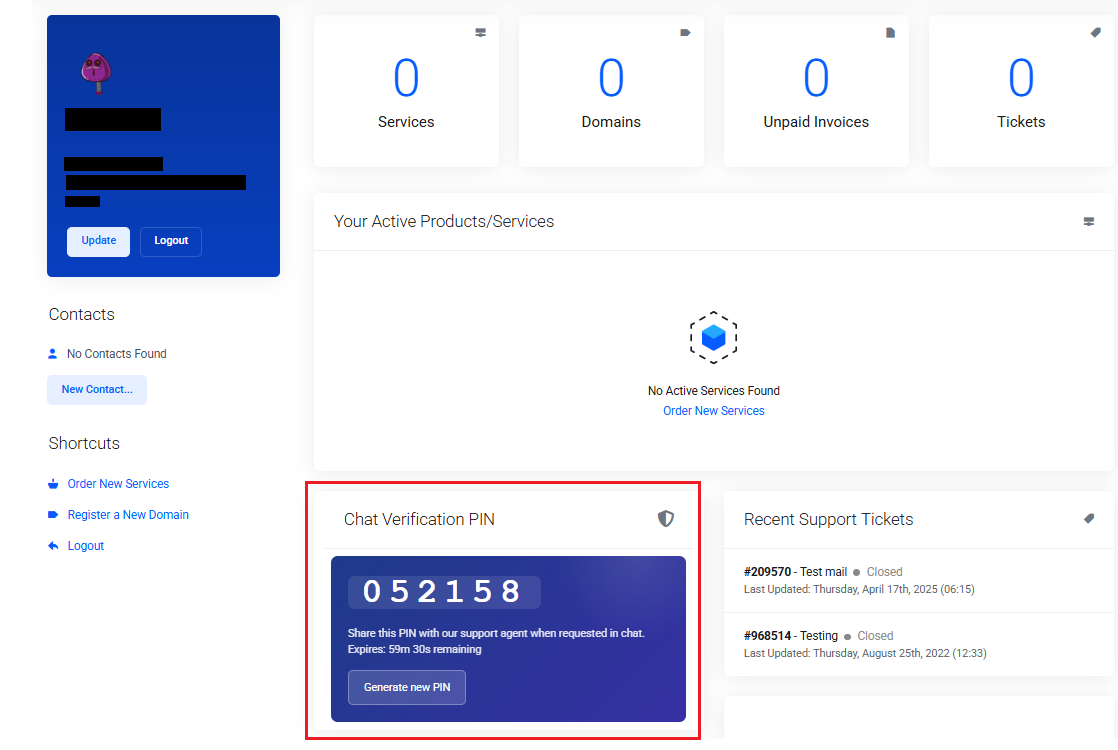
Once the verification is completed, the support person will proceed with your request.
Notes:
1. The code will expire every hour and regenerate itself. You will also have the option to regenerate the new PIN.
2. While selected issues still demand escalation, this feature ensures that requests are processed immediately, which comes under the possible situation.
This verification helps you to keep your account secure and safe. Moreover, we can help you with the queries immediately with authorization.
For detailed information, Click Here!


