logo
Sign in
  • icon Client Area
  • icon SeekaHost.app
  • icon SeekaHost.co.uk
  • icon SeekaHost.in
  • Home
  • Services
    • Close
    • Domains
      • Register DomainRegister Domain
        Get your custom domain
        • Domain PricingDomain Pricing
          Affordable rates for every domain
      • Transfer DomainTransfer Domain
        Move your domain to us
        • SSL Certificates
          Secure site with HTTPS
      • Expired Domains IconExpired Domains
        Find free expired domains
    • Hosting
      • WordPress Hosting
        Optimized WordPress hosting
      • Personal HostingPersonal Hosting
        Basic hosting for personal sites
      • Business Web HostingBusiness Web Hosting
        Ideal for business websites
      • Business-HostingEmail Hosting
        Professional email for your business
    • Servers
      • VPS Hosting
        Scalable virtual private servers
      • Dedicated Servers
        Full control over physical server
    • IP Hosting
      • Web Hosting CanadaA Class Hosting
        Premium single-IP SEO hosting
      • B Class HostingB Class Hosting
        Multiple IP range hosting
      • PBN HostingPBN Hosting (C Class)
        Host private blog networks
      • SEO HostingSEO Hosting
        High Performance SEO hosting
  • Sign in
    • Close
    • Client Area
      Manage your seekahost.com services and billing
    • SeekaHost.app
      Access app hosting dashboard and support
    • SeekaHost.co.uk
      Control UK hosting plans and domains
    • SeekaHost.in
      Login for Indian hosting account management
site logo
  • Home
  • Domains
    • Register-Domain

      Register Domain

      Transfer Domain

      Transfer Domain

      free expired domain list

      Domain Pricing

      SSL Certificates

      SSL Certificates

      Premium Domains

      Premium Domains

      free expired domain list

      Free Expired Domains List

  • Hosting
    • Personal Web Hosting

      Personal Web Hosting

      Business Web Hosting

      Business Web Hosting

      Cheap Web Hosting

      Cheap Web Hosting

      WordPress Web Hosting

      WordPress Web Hosting

      Premium SEO Hosting

      Premium SEO Hosting

      Private Blog Hosting

      Private Blog Hosting

      vps hosting

      Virtual Private Server Hosting

      dedicated server hosting

      Dedicated Server Hosting

      Reseller Web Hosting

      Reseller Web Hosting

  • Create Website
  • Marketing
    • Learn DIY Marketing

      Online Marketing

      Google AdWords Services

      Google AdWords

      Online business listing

      Business Listing

      Learn DIY Marketing

      Learn DIY Marketing

  • Sign in
    • icon Client Area
    • icon SeekaHost.app
    • icon SeekaHost.co.uk
    • icon SeekaHost.in

Knowledge from SeekaHosters

Private Blog Networks PBN SEO Tips Find Expired Domains Expired Domains Guide Invest In Domains
Create email account In Virtualmin

How to create an Email Account in Virtualmin?

How to create an Email Account in Virtualmin?

By Swetha

Create email account In Virtualmin

When it comes to communication, email is the best way of professional communication with clients.

Email is simple and easy to use. Once your account is set up, composing, sending, and receiving messages is simple.

An email account is the most important for a website. That email should be fast and convenient from which you can share files, documents, and anything over the internet.

Here we will see how to create an email account for your website in Virtualmin.

Step 1 :

Log in to your Virtualmin account.
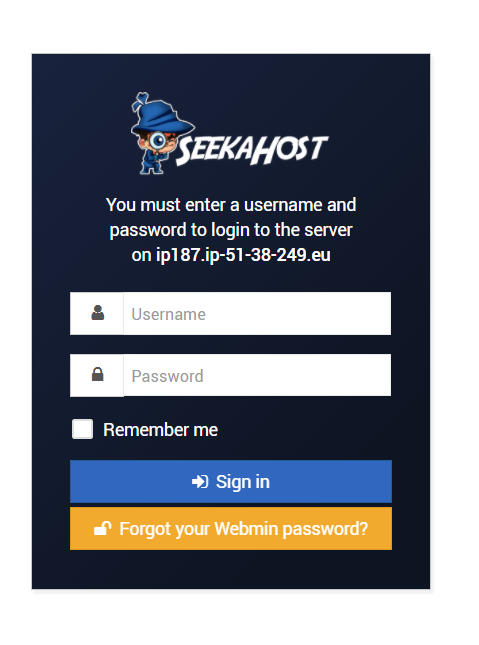
Virtualmin login page

Step 2:

Once you logged in, go to the dashboard which is on the left-hand side. Select your domain name click “ Edit User”.
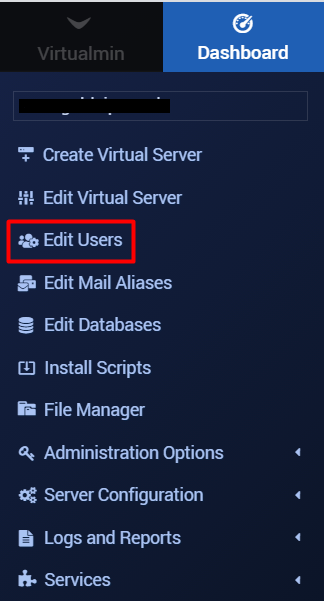
Edit Users - Email account

Step 3:

On the Edit Users page, click on  “Add a User to this Server”.
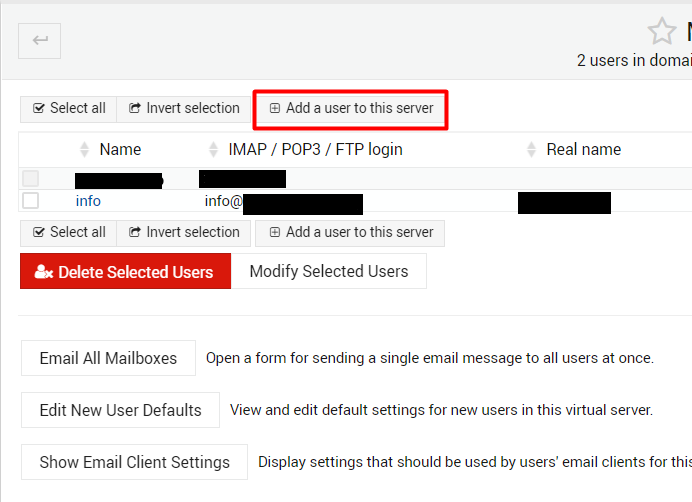
Add a user to this server

Step 4:

You will be navigated to the “Create User” page.  Next, enter the Email Address, Real Email settings Name, password as per your requirement. Leave the Quota and home directory settings as it is and set other user permissions as default.

In case of if you want to forward your emails to another address, you can enter the email address where you want to forward the mails in the Email Forwarding Section.
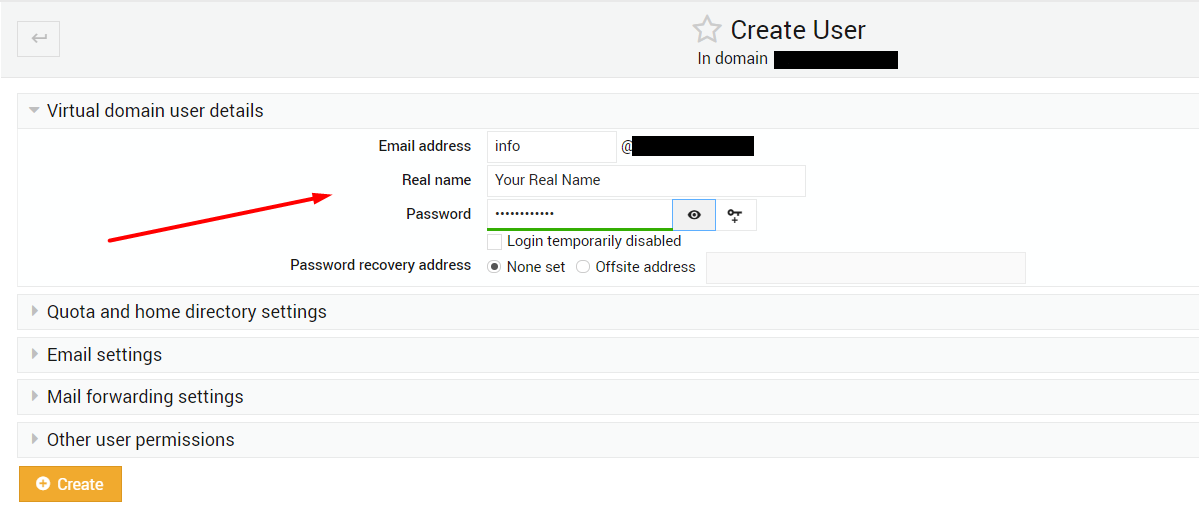
create user


Step 5 :

At last, click the “Create” button to create a new Email account.
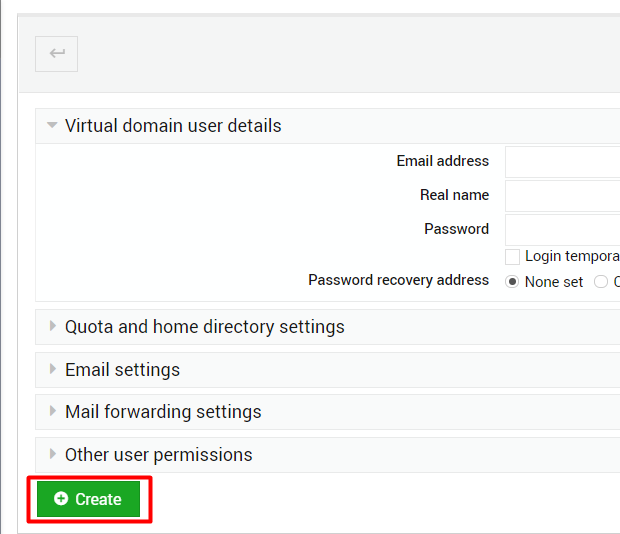
 

Create email account

Step 6:

After creating the email account, then go back to the “Mail and FTP Users“. Click the email account name that you have created now. It will display the “Edit User” page.
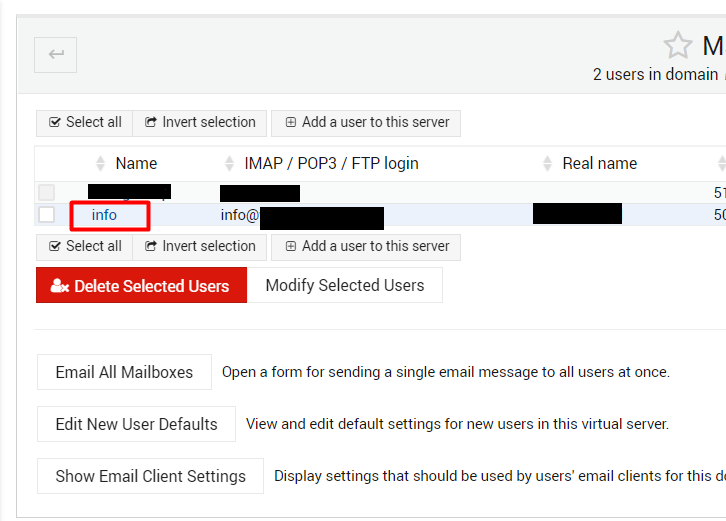
Email account name

Step 7  :

In the Email Setting section, you can see the path of your mail directory. Click that path to log in to your mail account.
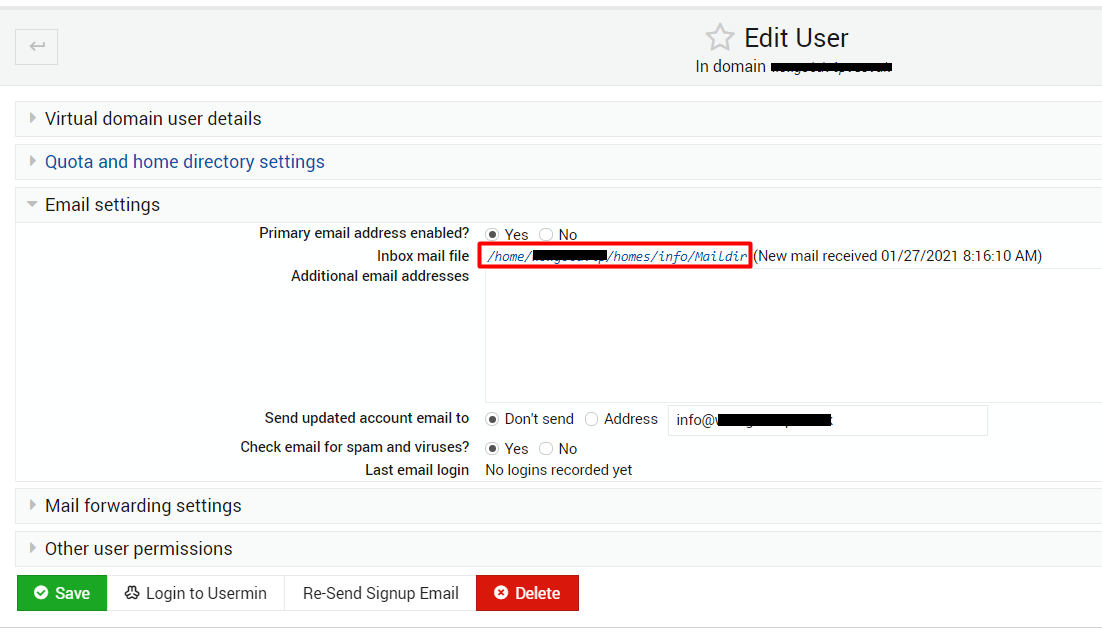
Email setting_Inbox mail file


Finally, your email account was ready!

If you are a registered user in SeekaHost and have any queries to be clarified or issues to be sorted, you can raise a ticket through the client area dashboard or email to [email protected]. For immediate interaction or guidelines, contact our support team available in LiveChat at the right bottom corner of the website.

Share to spread the knowledge!

Welcome!

Must Reads Online Guides..
  • Top 10 Dropshipping Products
  • Affiliate Marketing Money Making
  • Top 10 Affiliate Marketers list
  • Influence of Artificial Intelligence
  • Best WordPress hosting for SEO
WordPress-hosting-for-SEO

Recent Posts

  • How to Install Cockpit in Linux server
  • ERROR:BAILOUT malware detected
  • How to Fix 421 Misdirected Request
  • How to Change Nameservers on SAV.com
  • How to Connect Domain to Wix? – 2 Simple Methods
PBN-Hosting
VPS-Hosting
affiliate-marketing
Get cheap .com domains
  • Connect with us

Our Company

  • About SeekaHost™
  • SeekaHost™ University
  • Contact Us
  • Client area
  • SeekaHost Blog
  • Web Consultant
  • Careers

Domain & SSL Certificate

  • Register a Domain
  • Transfer a Domain
  • Expired Domain Names
  • Check Domain History
  • Domain Pricing
  • SSL Certificate

Our Web Hosting Guide

  • Expired Domains Buying Guide
  • Different Types of Web Hosting
  • How to use One Click Installer
  • Know the DNS Related Terms
  • How to Fix DNS Server Error?
site logo

© 2025 SeekaHost™ Ltd.
Web Hosting Company

  • USA +1 8887477170
  • UK +44 330 058 1995
  • India +91 63690 50221
  • Service Status

Copyright © 2025 SeekaHost Ltd. All Rights Reserved.

By using this site, you agree to the Universal Terms of Service.
Terms & Conditions | Privacy Policies | Cookie Policy | Refund Policy

Pay with confidence & security

seekahost hosting payment methods