
 SeekaHost.com Client Area
  SeekaHost.app
  SeekaHost.co.uk
  SeekaHost.in
How To Disable Comments In WordPress Website?

By Robert Mills
Disable Comments In WordPress is one of the important measures to be taken in WordPress Website. Most of the visitors review your website’s comments and then start using your products/service.
If you choose to enable comments on your site, then a comment will appear at the bottom of your website’s page. Despite this feeling surrounding commenting, there are a lot of benefits to letting engage with your content.
Fortunately, if you aren’t using the comments, you can possibly disable WordPress comments, there are a few steps to do so.
In this article, we will explain to you step by step on how to disable comments in WordPress.
Disable Comments on All Posts:
If you have just started your WordPress site, you can easily stop comments on your future posts. Before following steps, ensure you have installed the WordPress and added post/pages on the website.
Step 1: Login to your website’s WordPress dashboard.
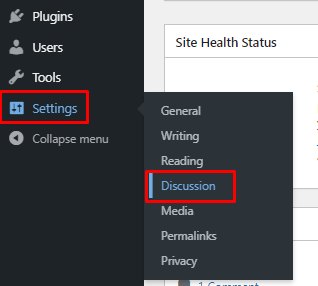
Step 2: Click Settings -> Discussion in your WordPress dashboard on left side.
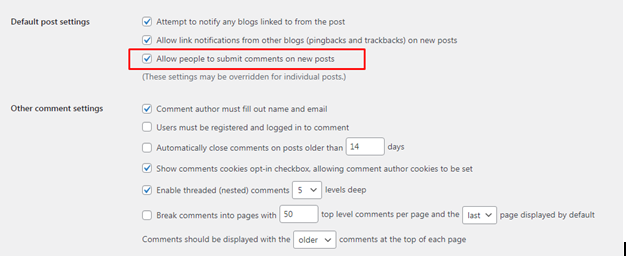
Step 3: On this page, remove the checkbox “Allow people to submit comments on new posts”.
This will be disabling comments and pings entirely on all future posts on your site and page comments are disabled by default.
Step 4: Click on the Save changes button on your Settings page.
Comments Disable on Individual Pages or Posts:
WordPress gives you the option to enable or disable comments on individual pages or posts.
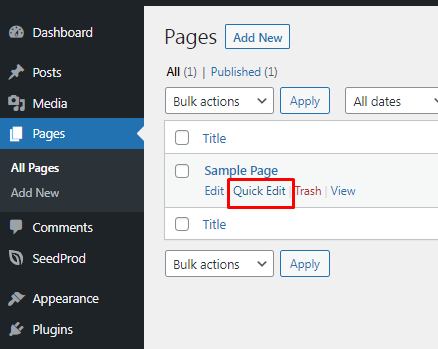
Step 1: You can see the Pages feature on your WordPress Dashboard. Click the Pages -> All Pages option, you will be on the page where all the pages appear.
You need to select over the title of a page and click the Quick Edit option.
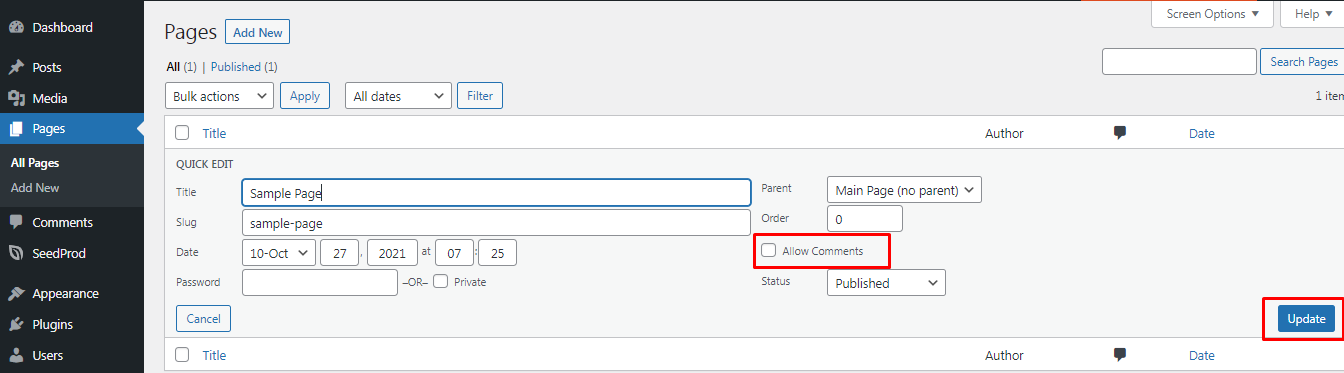
Step 2: On clicking Quick Edit, you can see the option as Allow Comments. Uncheck the checkbox to disable it.
Finally, click on Update to save the changes for the individual page.
If you want to delete all comments, you can delete comments through phpmyadmin as well.
Hope this article is helpful for you to Disable Comments In WordPress website.