
logo
Sign in
  • icon SeekaHost.com Client Area
  • icon SeekaHost.app
  • icon SeekaHost.co.uk
  • icon SeekaHost.in
  • Home
  • Domains
    • Close
    • Register DomainRegister Domain
      Get your custom domain
    • Domain-PricingDomain Pricing
      Affordable rates for TLDs
    • Transfer DomainTransfer Domain
      Move your domain to us
    • SSL Certificate
      Secure site with HTTPS
    • Premium Expired DomainsPremium Domains
      Buy valuable expired domains
    • Expired Domains IconExpired Domains
      Find free expired domains
  • Hosting
    • Close
    • Wordpress-HostingWordPress Hosting
      Optimized WordPress hosting
    • Personal HostingPersonal Hosting
      Basic hosting for personal sites
    • Business Web HostingBusiness Web Hosting
      Ideal for business websites
    • Business-HostingEmail Hosting
      Professional email for business
    • Cheap Web HostingCheap Web Hosting
      Low-cost hosting for small sites
    • Woo HostingWooCommerce Hosting
      Powering secure online stores
  • Servers
    • Close
    • VPS Hosting
      Scalable virtual private servers
    • Dedicated Servers
      Full control over physical server
    • Reseller Web HostingReseller Web Hosting
      Sell hosting with our resources
    • n8nn8n Self Hosting
      Launch your n8n workflows
  • IP Hosting
    • Close
    • Web Hosting CanadaA Class Hosting
      Premium single-IP SEO hosting
    • B Class HostingB Class Hosting
      Multiple IP range hosting
    • PBN HostingPBN Hosting (C Class)
      Host private blog networks
    • SEO HostingSEO Hosting
      High Performance SEO hosting
  • Sign in
    • Close
    • SeekaHost.com
      Portal Login to Manage your Accounts & Services
    • SeekaHost.app
      Portal Login to Manage your Accounts & Services
    • SeekaHost.co.uk
      Portal Login to Manage your Accounts & Services
    • SeekaHost.in
      Portal Login to Manage your Accounts & Services
site logo
  • Home
  • Domains
    • Register-Domain

      Register Domain

      Transfer Domain

      Transfer Domain

      free expired domain list

      Domain Pricing

      SSL Certificates

      SSL Certificates

      Premium Domains

      Premium Domains

      free expired domain list

      Free Expired Domains List

  • Hosting
    • Personal Web Hosting

      Personal Web Hosting

      Business Web Hosting

      Business Web Hosting

      Cheap Web Hosting

      Cheap Web Hosting

      WordPress Web Hosting

      WordPress Web Hosting

      Premium SEO Hosting

      Premium SEO Hosting

      Private Blog Hosting

      Private Blog Hosting

      vps hosting

      Virtual Private Server Hosting

      dedicated server hosting

      Dedicated Server Hosting

      Reseller Web Hosting

      Reseller Web Hosting

  • Create Website
  • Marketing
    • Learn DIY Marketing

      Online Marketing

      Google AdWords Services

      Google AdWords

      Online business listing

      Business Listing

      Learn DIY Marketing

      Learn DIY Marketing

  • Sign in
    • icon Client Area
    • icon SeekaHost.app
    • icon SeekaHost.co.uk
    • icon SeekaHost.in

Knowledge from SeekaHosters

Private Blog Networks PBN SEO Tips Find Expired Domains Expired Domains Guide Invest In Domains
Steps to Add FTP Account in Plesk

How to Add FTP Account in Plesk?

How to Add FTP Account in Plesk?

By Frank Carson

An FTP account is used for uploading and managing files in your website. Having FTP account will give fast access to your website files on the internet. When you purchased hosting, a Plesk account FTP account is automatically generated. You can use your Plesk username and password to log on it.

Let’s see how to create Ftp account in Plesk:

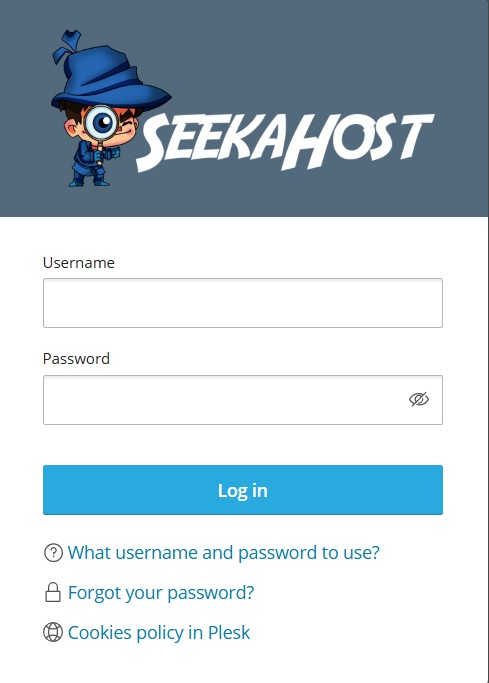
 Step 1: Log in to your Plesk Control Panel using domain:8443 or IP:8443
Step 2: Navigate to the dashboard of your website and click FTP option
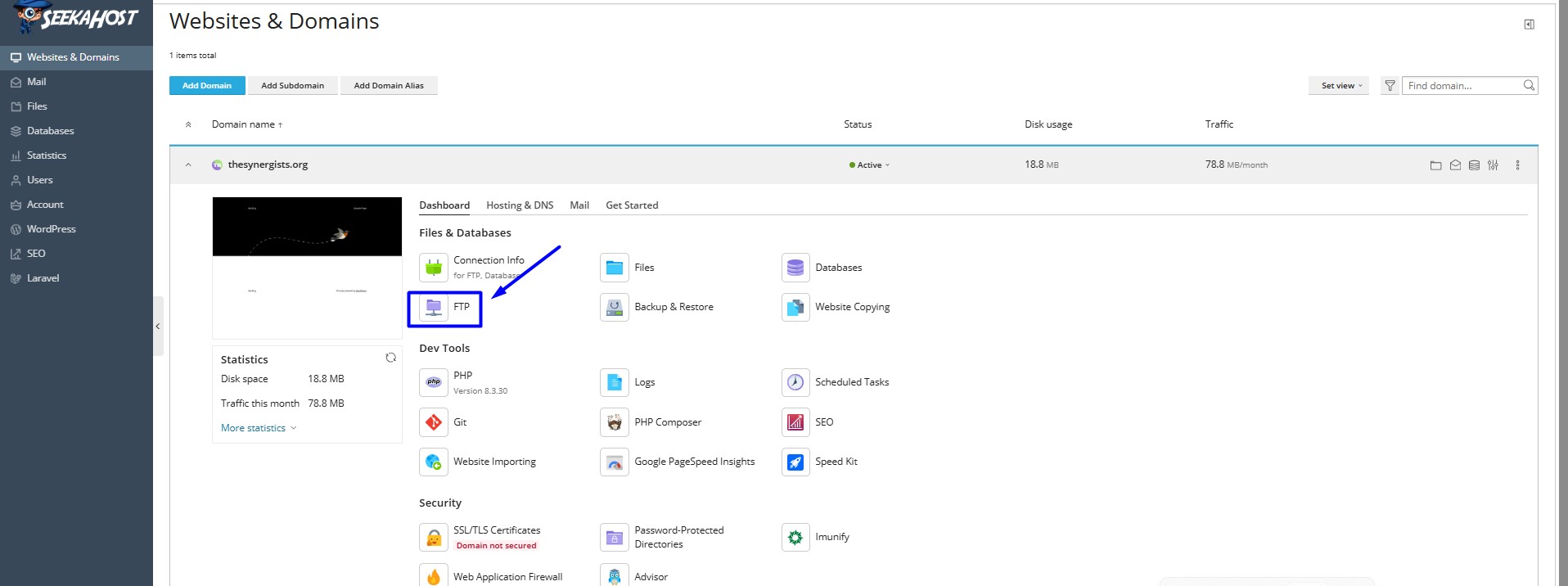


Step 2 : Click add an Ftp account option

Step 3 : Enter the Ftp Credentials
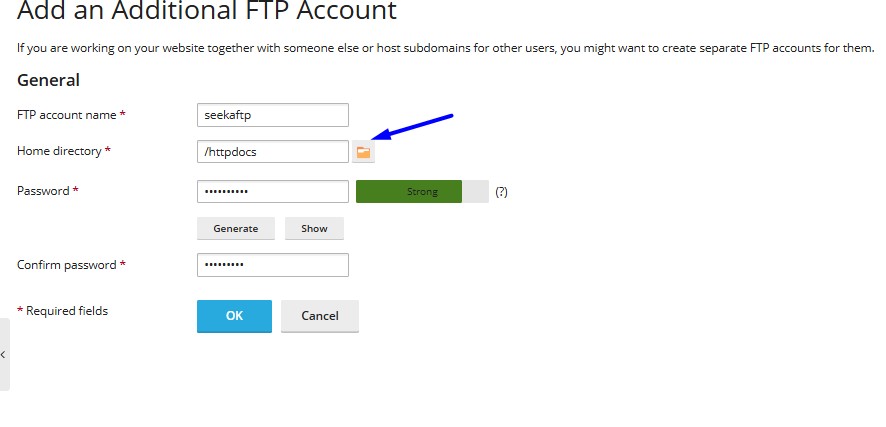
Add the ftp credentials

Ftp Setting :

Ftp account Name : Enter your ftp account name
Home directory:
Enter your home directory path or choose the folder path from the directory
Password:
Enter your ftp password
Confirm password:
Enter the same password to confirm

Then click ok option to create

Step 4: Now you can you login to your FTP client with credentials

Edit the ftp Details

You can click the ftp user and change the password or location path of the ftp user


If you want to delete the ftp account, you can tick the checkbox of your appropriate ftp user account and click the remove option.

Share to spread the knowledge!

Welcome!

Must Reads Online Guides..
  • Top 10 Dropshipping Products
  • Affiliate Marketing Money Making
  • Top 10 Affiliate Marketers list
  • Influence of Artificial Intelligence
  • Best WordPress hosting for SEO
WordPress-hosting-for-SEO

Recent Posts

  • How To Limit Login Attempts In WordPress?
  • Benefits of Registering Multiple Domain Names
  • Webflow vs WordPress: Which is Better For Your Website
  • How To Exclude Specific Pages From WordPress Search Results?
  • Why .design Domain Perfect For Designers & Creatives?
PBN-Hosting
VPS-Hosting
affiliate-marketing
Get cheap .com domains
  • Connect with us

Our Company

  • About SeekaHost™
  • SeekaHost™ University
  • Contact Us
  • Client area
  • SeekaHost Blog
  • Web Consultant
  • Careers

Domain & SSL Certificate

  • Register a Domain
  • Transfer a Domain
  • Expired Domain Names
  • Check Domain History
  • Domain Pricing
  • SSL Certificate

Our Web Hosting Guide

  • Expired Domains Buying Guide
  • Different Types of Web Hosting
  • How to use One Click Installer
  • Setup UFW Firewall in Ubuntu 22.04
  • Download Domain List in PBN Hosting Package
  • How to Fix DNS Server Error?
site logo

© 2026 SeekaHost™ Ltd.
Web Hosting Company

  • USA +1 8887477170
  • UK +44 330 058 1995
  • India +91 63690 50221
  • Service Status

Copyright © 2026 SeekaHost Ltd. All Rights Reserved.

By using this site, you agree to the Universal Terms of Service.
Terms & Conditions | Privacy Policies | Cookie Policy | Refund Policy

Pay with confidence & security

seekahost hosting payment methods

Premium WordPress HostingGet Now

Cheap Domain RegistrationGet Now